Obsidian Plugin
Tag and Tally Plugin - Complete Command Reference
Dice Commands
Syntax
`dice:formula`or`dice: formula`- Creates an interactive dice roll with a reroll button`roll:formula`or`roll: formula`- Replaces the code block with the dice result permanently
Where formula is any valid dice notation supported by the dice roller (e.g., 1d6, 2d20+5, 3d6-2, etc.).
Examples
`dice:1d6`- An interactive d6 roll that can be rerolled`dice: 2d20+5`- An interactive roll of two d20s plus 5`dice:3d6-2`- An interactive roll of three d6s minus 2`roll:1d20`- A d20 roll that replaces the code with the result`roll: 3d6+2`- A roll that permanently replaces the code with the result`roll:2d10-1`- A roll that replaces the code with the result
Usage
Interactive Dice (dice:):
- Displays the dice result with a reroll button (↻)
- Rerolls automatically when the page is viewed or refreshed
- Click the reroll button to manually reroll the dice
- The result persists across page views until manually rerolled
- Works in both reading view and live preview mode
Roll Blocks (roll:):
- Immediately replaces the code block with the dice result
- The result is written directly to the note file
- Once replaced, the code block is gone and only the result remains
- Works in both reading view and live preview mode
- The result format shows the formula, individual dice rolls, and total (e.g.,
1d20: [19] = 19)
Output Format
The dice roller uses the output format from @dice-roller/rpg-dice-roller, which displays:
- The formula
- Individual dice results in brackets
- The total result
Example: `roll:1d20` might become 1d20: [19] = 19 in your note.
Tag Commands
Syntax
`tag:(type) T(tier) (Tag information) %(tally) ^(flag) !`
Tag Types
Tags are organized into categories with specific colors:
Umbrella Tags (Purple):
umbrella- Umbrella tagsspecial- Special tagsspecies- Species tagstype- Type tagsaged- Aged tags
Skill Tags (Blue):
skill- Skill tagsability- Ability tags (same as skill)attack- Attack tags
Condition Tags (Yellow):
condition- Condition tagsreputation- Reputation tags
Generic Tags (Gray):
background- Background tagsexperience- Experience tagslanguage- Language tagsgoal- Goal tagssecret- Secret tagslocation- Location tagsspell- Spell tagsitem- Item tagsuse- Use tags (same as item)
Danger Tags (Red):
flaw- Flaw tagsweakness- Weakness tags (same as flaw)damage- Damage tagswound- Wound tags (same as damage)
Environment Tags (Brown):
scene- Scene tags
Trait Tags (Green):
trait- Trait tagsstrong- Strength tagsdescriptor- Descriptor tagsdrive- Drive tags
Parameters
(type)- Optional tag type (see above)T(tier)- Optional tier number (1-4)(Tag information)- Required tag description%(tally)- Optional tally/count value (1-5)^(flag)- Optional flag (xfor secret,sfor strength,wfor weakness,lfor unknown location)!- Optional temporary tag modifier (indicates the tag lasts a number of scenes)
Examples
`tag:skill T3 Swordsmanship`- A tier 3 skill tag`tag:item Potion of Healing %3`- An item tag with tally of 3`tag:spell T1 Fireball`- A tier 1 spell tag`tag:condition Exhausted !`- A temporary condition tag`tag:damage T2 Broken Leg %2 !`- A temporary tier 2 damage tag with tally of 2`tag:location Hidden Cave ^l`- A location tag with unknown location flag
Sentence Commands
Syntax
`sentence:type` or `sentence: type`
With Theme (Optional):
`sentence:type:theme` or `sentence: type: theme`
Where theme is one of: fantasy (default), modern, or monster-hunter
Sentence Types
The following sentence types are supported (case-insensitive):
scene- Generates scene descriptionscreature- Generates creature descriptionsquest- Generates quest descriptionsnpcorcharacter- Generates NPC/character descriptionsspecies- Generates species descriptionstype- Generates type descriptionswounds- Generates wound descriptionsfaction- Generates faction descriptions (supports themes: fantasy, modern, monster-hunter)location- Generates location descriptionsdungeon- Generates dungeon descriptionslair- Generates lair descriptionsroom- Generates room descriptionsarmor- Generates armor descriptionsitem- Generates item descriptionsweapon- Generates weapon descriptionstrap- Generates trap descriptionsconsumable- Generates consumable descriptionsresource- Generates resource descriptionsspell- Generates spell descriptionsclue- Generates clue descriptions
Theme Support
Some sentence types support theme-specific generation. When a theme is specified, the sentence will use theme-specific tables instead of generic ones.
Supported Themes:
fantasy- Default theme, uses fantasy-specific tablesmodern- Modern setting, uses modern-specific tablesmonster-hunter- Monster Hunter setting, uses monster-hunter-specific tables
Faction Sentences with Themes:
`sentence:faction`- Generates a fantasy faction (default)`sentence:faction:modern`- Generates a modern faction with modern-specific:- Descriptors (Corporate, Tech, Government, Criminal, etc.)
- Organization types (Corporation, Syndicate, Agency, Network, Gang, Cult, etc.)
- Core functions (controls tech markets, manipulates financial markets, etc.)
- Goals (to achieve market dominance, to control the government, etc.)
- Secrets (are secretly a front organization, controlled by a rival corporation, etc.)
- Names (The Neon Network, Cyber Circle, Steel Protocol, etc.)
`sentence:faction:fantasy`- Explicitly generates a fantasy faction`sentence:faction:monster-hunter`- Generates a monster-hunter faction
Examples
`sentence:scene``sentence:npc``sentence:creature``sentence:spell``sentence:location``sentence:faction:modern`- Generates a modern faction description`sentence:npc:modern`- Generates a modern NPC description
Random Table Commands
Syntax
`random:table-name`or`random: table-name`- Interactive roll (can be rerolled)`pick:table-name`or`pick: table-name`- Permanent roll (replaces code)
Note: Table names support partial matching (e.g., random:natural matches natural-disaster).
Available Tables (455 total)
Scene & Environment
scene-typescene-descriptorscene-complicationscene-confrontationscene-connectionscene-discoveryscene-flashbackscene-preparationscene-reflectionscene-transitiontier1-scenetier2-scenetier3-scenetier4-scenenatural-disasterartificial-disasterseasonweathertime-of-dayphase-of-the-moonpoint-of-interest
Creature Generation
creature-typecreature-descriptorcreature-motivationcreature-dispositioncreature-name-prefixcreature-name-animalcreature-name-automationcreature-name-celestialcreature-name-draconiccreature-name-elementalcreature-name-feycreature-name-fiendcreature-name-ghostcreature-name-giantcreature-name-golemcreature-name-insectcreature-name-mechanicalcreature-name-monstrositycreature-name-ooze-slimecreature-name-plantcreature-name-shadowcreature-name-undeadcreature-name-alien
Creature Attacks
creature-attack-aliencreature-attack-animalcreature-attack-automationcreature-attack-beastcreature-attack-celestialcreature-attack-choice-chaoscreature-attack-choice-elementalcreature-attack-choice-necroticcreature-attack-choice-physicalcreature-attack-choice-psychiccreature-attack-choice-radiantcreature-attack-choice-shadowcreature-attack-choice-toxiccreature-attack-draconiccreature-attack-elementalcreature-attack-etherealcreature-attack-feycreature-attack-fiendcreature-attack-giantcreature-attack-golemcreature-attack-humanoidcreature-attack-insectcreature-attack-mechcreature-attack-monstrositycreature-attack-ooze-slimecreature-attack-plantcreature-attack-undead
Creature Special Abilities
creature-special-ability-aliencreature-special-ability-animalcreature-special-ability-automationcreature-special-ability-celestialcreature-special-ability-chimeracreature-special-ability-draconiccreature-special-ability-elementalcreature-special-ability-feycreature-special-ability-fiendcreature-special-ability-ghostcreature-special-ability-giantcreature-special-ability-golemcreature-special-ability-humanoidcreature-special-ability-insectcreature-special-ability-mechanicalcreature-special-ability-monstrositycreature-special-ability-ooze-slimecreature-special-ability-plantcreature-special-ability-shadowcreature-special-ability-undead
Creature Strengths
creature-strength-aliencreature-strength-animalcreature-strength-automationcreature-strength-celestialcreature-strength-chimeracreature-strength-draconiccreature-strength-elementalcreature-strength-feycreature-strength-fiendcreature-strength-ghostcreature-strength-giantcreature-strength-golemcreature-strength-humanoidcreature-strength-insectcreature-strength-mechanicalcreature-strength-monstrositycreature-strength-ooze-slimecreature-strength-plantcreature-strength-shadowcreature-strength-undead
Creature Weaknesses
creature-weakness-aliencreature-weakness-animalcreature-weakness-automationcreature-weakness-celestialcreature-weakness-chimeracreature-weakness-draconiccreature-weakness-elementalcreature-weakness-feycreature-weakness-fiendcreature-weakness-ghostcreature-weakness-giantcreature-weakness-golemcreature-weakness-humanoidcreature-weakness-insectcreature-weakness-mechanicalcreature-weakness-monstrositycreature-weakness-ooze-slimecreature-weakness-plantcreature-weakness-shadowcreature-weakness-undead
Character/NPC
character-attack-choicecharacter-goal-nouncharacter-goal-verbcharacter-motivation-nouncharacter-motivation-verbcharacter-secret-nouncharacter-secret-verbcharacter-species-agedcharacter-species-cultural-traitcharacter-species-descriptorcharacter-species-featurenpc-name-part-1npc-name-part-2npc-name-part-3npc-name-part-4
Gear & Items
armor-descriptorarmor-specialarmor-typematerial-armorconsumable-descriptorconsumable-effectconsumable-specialconsumable-typeitem-descriptoritem-specialitem-typeweapon-descriptorweapon-specialweapon-typematerial-weapontrap-descriptortrap-effecttrap-typetrigger-typeresource-descriptorresource-specialresource-typeresource-rarity
Spells
spell-basespell-aspectspell-typespell-artifactspell-target
Wounds & Damage
wound-type-of-markwound-body-partwound-damagewound-descriptordamage-type
Wound Types by Damage Type
Each damage type has 4 wound types:
wound-physical-strainwound-physical-lingering-traumawound-physical-lasting-scarwound-physical-debilitating-injurywound-detriment-physical-strainwound-detriment-physical-lingering-traumawound-detriment-physical-lasting-scarwound-detriment-physical-debilitating-injury
(Repeat for: chaos, elemental, necrotic, psychic, radiant, shadow, toxic)
Quest & Inspiration
quest-typequest-objective-buildquest-objective-collectquest-objective-deliverquest-objective-destroyquest-objective-explorequest-objective-findquest-objective-huntquest-objective-infiltratequest-objective-influencequest-objective-investigateinspiration-typeinspiration-adjectiveinspiration-benefitinspiration-complicationinspiration-emotioninspiration-environmentinspiration-motivationinspiration-nouninspiration-verb
Hex & Terrain
terrainterrain-featureterrain-adjacent-desertterrain-adjacent-forestterrain-adjacent-islandterrain-adjacent-magiclandsterrain-adjacent-mountainterrain-adjacent-plainsterrain-adjacent-swampterrain-adjacent-wastelandsdirectiondistancepoint-of-interestlandmark-typeevent-type
Dungeons (Fantasy)
fantasy-dungeon-typefantasy-dungeon-descriptivefantasy-dungeon-distinctive-featurefantasy-dungeon-objectivefantasy-dungeon-name-patternfantasy-dungeon-name-typefantasy-dungeon-name-descriptorfantasy-dungeon-name-threatfantasy-dungeon-name-adjectivefantasy-dungeon-artifactfantasy-dungeon-thingsfantasy-dungeon-creaturesfantasy-dungeon-someonefantasy-dungeon-bossdungeon-contentsdungeon-doordungeon-secrets
Dungeons (Modern)
modern-dungeon-typemodern-dungeon-descriptivemodern-dungeon-distinctive-featuremodern-dungeon-objectivemodern-dungeon-name-patternmodern-dungeon-name-typemodern-dungeon-name-descriptormodern-dungeon-name-threatmodern-dungeon-name-adjectivemodern-dungeon-artifactmodern-dungeon-thingsmodern-dungeon-hostilesmodern-dungeon-someonemodern-dungeon-bossroom-typeroom-descriptiveroom-distinctive-featurelair-typelair-descriptivelair-distinctive-featurelair-name-adjectivelair-name-descriptorlair-name-patternlair-name-type
Locations
location-typelocation-descriptivelocation-distinctive-feature
Lore & Factions
faction-descriptorfaction-organization-typefaction-core-functionfaction-goal-nounfaction-goal-verbfaction-secret-nounfaction-secret-verbfaction-name-patternfaction-name-adjective-1faction-name-adjective-2faction-name-organizationfaction-name-placefaction-name-somethingfaction-notable-trait
Fantasy Setting Tables
fantasy-descriptorfantasy-discovery-verbfantasy-discovery-adjectivefantasy-discovery-nounfantasy-points-of-interestfantasy-districtsfantasy-speciesfantasy-type-classfantasy-type-criminalfantasy-type-professionfantasy-verbfantasy-somethingfantasy-name-patterns
Fantasy Dungeon Tables
fantasy-dungeon-name-typefantasy-dungeon-name-descriptorfantasy-dungeon-name-threatfantasy-dungeon-name-adjectivefantasy-dungeon-name-patternfantasy-dungeon-artifactfantasy-dungeon-bossfantasy-dungeon-creaturesfantasy-dungeon-someonefantasy-dungeon-things
Fantasy District Adjacent Tables
fantasy-adjacent-adminfantasy-adjacent-arcanefantasy-adjacent-centralfantasy-adjacent-craftsfantasy-adjacent-entertainmentfantasy-adjacent-gardenfantasy-adjacent-industrialfantasy-adjacent-marketfantasy-adjacent-noblefantasy-adjacent-religiousfantasy-adjacent-residentialfantasy-adjacent-scholarfantasy-adjacent-slumsfantasy-adjacent-trade
Modern/Urban Setting Tables
modern-descriptormodern-discovery-verbmodern-discovery-adjectivemodern-discovery-nounmodern-featuremodern-typemodern-verbmodern-somethingmodern-common-npcmodern-female-firstnamemodern-female-middlenamemodern-male-firstnamemodern-male-middlenamemodern-lastname
Modern District Adjacent Tables
modern-adjacent-commercialmodern-adjacent-downtownmodern-adjacent-entertainmentmodern-adjacent-financialmodern-adjacent-governmentmodern-adjacent-high-classmodern-adjacent-industrialmodern-adjacent-medical-parkmodern-adjacent-middle-classmodern-adjacent-parkmodern-adjacent-slumsmodern-adjacent-techmodern-adjacent-universitymodern-adjacent-warehouse
District Encounter Tables (Modern/Urban)
Each district has three tables (verb, adjective, noun):
district-commercial-verb,district-commercial-adjective,district-commercial-noundistrict-downtown-verb,district-downtown-adjective,district-downtown-noundistrict-entertainment-verb,district-entertainment-adjective,district-entertainment-noundistrict-financial-verb,district-financial-adjective,district-financial-noundistrict-government-verb,district-government-adjective,district-government-noundistrict-high-class-verb,district-high-class-adjective,district-high-class-noundistrict-home-verb,district-home-adjective,district-home-noundistrict-industrial-verb,district-industrial-adjective,district-industrial-noundistrict-medical-park-verb,district-medical-park-adjective,district-medical-park-noundistrict-middle-class-verb,district-middle-class-adjective,district-middle-class-noundistrict-park-verb,district-park-adjective,district-park-noundistrict-slums-verb,district-slums-adjective,district-slums-noundistrict-subway-station-verb,district-subway-station-adjective,district-subway-station-noundistrict-tech-verb,district-tech-adjective,district-tech-noundistrict-university-verb,district-university-adjective,district-university-noundistrict-warehouse-verb,district-warehouse-adjective,district-warehouse-noundistrict-work-verb,district-work-adjective,district-work-noundistricts
Discovery Tables (by Terrain Type)
Each terrain type has three tables (verb, adjective, noun):
discovery-desert-verb,discovery-desert-adjective,discovery-desert-noundiscovery-forest-verb,discovery-forest-adjective,discovery-forest-noundiscovery-island-verb,discovery-island-adjective,discovery-island-noundiscovery-magiclands-verb,discovery-magiclands-adjective,discovery-magiclands-noundiscovery-mountain-verb,discovery-mountain-adjective,discovery-mountain-noundiscovery-plains-verb,discovery-plains-adjective,discovery-plains-noundiscovery-swamp-verb,discovery-swamp-adjective,discovery-swamp-noundiscovery-wastelands-verb,discovery-wastelands-adjective,discovery-wastelands-noun
Clue Generation
clue-subjectclue-statusclue-modifier-questclue-modifier-npcclue-modifier-factionclue-modifier-creatureclue-modifier-character-arc
Monster Hunter Setting Tables
monster-hunter-does-somethingmonster-hunter-focusmonster-hunter-type
Examples
`random:season``random:natural-disaster``pick:weather``pick:creature-type``random:fantasy-points-of-interest``pick:urban-npc``random:creature-attack-draconic``pick:quest-objective-find`
Custom Tables
You can create your own custom tables by placing markdown files in a folder (default: _tables). Custom tables work just like built-in tables and can be used with both random: and pick: commands.
Syntax
`custom {table-name}`or`custom {table-name} {other-table}`- Permanent roll (replaces code, likepick:)`custom-random:table-name`or`custom-random: table-name`- Interactive roll (can be rerolled, likerandom:)
Multiple Tables: You can specify multiple tables in a single custom statement. All tables are rolled independently and results are combined with spaces (similar to how sentence works).
Setting Up Custom Tables
-
Configure the folder (optional):
- Go to Settings → Tag and Tally → Custom tables folder
- Default folder is
_tables(in your vault root) - You can change this to any folder path
-
Create markdown files in your custom tables folder:
- Each file can contain multiple tables
- Tables are defined with
## Table Nameheaders - Followed by a markdown table with dice roll and value columns
-
Table Format:
## Table Name

| 1d20 | Value         |
| ---- | ------------- |
| 1    | First option  |
| 2    | Second option |
| 3    | Third option  |

...
Table Format Details
- Header: Use
## Table Name(two hash marks) to define a table - Dice Formula: First column header should contain a dice formula (e.g.,
1d20,1d10,1d4)- Supports bold markdown:
|**1d10**|**Effect**|works fine
- Supports bold markdown:
- Value Column: Second column header can be anything (e.g.,
Value,Effect,Result) - Rows: Each row contains:
- Roll number or range (e.g.,
1,2-5,10) - Value text (can include nested table references like
{other-table})
- Roll number or range (e.g.,
Examples
Single table:
`custom {my-table}`- Rolls on a custom table named "my-table"`custom-random:my-table`- Interactive roll on "my-table"
Multiple tables:
`custom {table1} {table2} {table3}`- Rolls on all three tables and combines results`custom {wild-magic-verb} {wild-magic-fire}`- Rolls on verb table and fire table
Table names:
- Table names are normalized (lowercase, spaces become dashes)
## Wild Magic Verbbecomeswild-magic-verb## Firebecomesfire- Use the normalized name in commands:
`custom {wild-magic-verb}`
Features
- Automatic Loading: Tables are automatically loaded when files are added, modified, or deleted
- Caching: Tables are cached for fast loading, even if the vault isn't fully indexed
- Nested References: Table results can contain references to other tables using
{table-name}syntax - Multiple Tables per File: One markdown file can contain multiple tables (each with its own
##header) - File Watching: Changes to table files are automatically detected and reloaded
Example Custom Table File
## Wild Magic Verb

| 1d20 | Verb        |
| ---- | ----------- |
| 1    | Transformed |
| 2    | Manifested  |
| 3    | Radiates    |

...

## Wild Magic Fire

| 1d10 | Effect                                    |
| ---- | ----------------------------------------- |
| 1    | dancing, harmless motes of heat.          |
| 2    | scorching hot air that causes exhaustion. |

...
Then use: `custom {wild-magic-verb} {wild-magic-fire}`
Text Mapper Commands
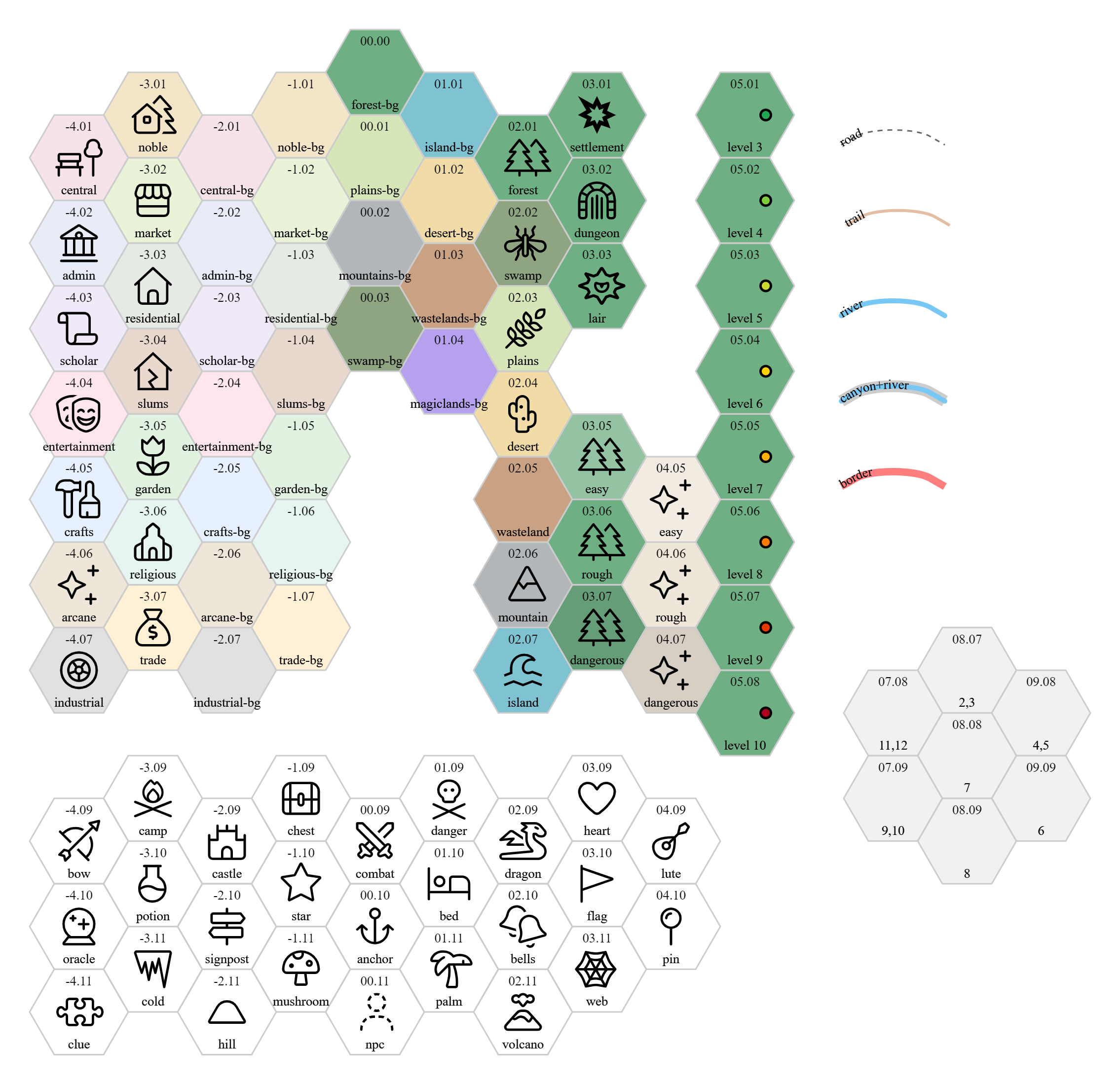
The Text Mapper allows you to create hex-based maps using a simple text syntax. Wrap your map code in a code block with the language text-mapper or textmapper.
Example
Basic Syntax
Hex Definitions
Define hexes using coordinate pairs followed by terrain or features:
XXXX YYYY terrain
XXXX YYYY terrain feature
XXXX YYYY ZZZ terrain feature
XXXX- X coordinate (2-4 digits, e.g.,04,-04,0405)YYYY- Y coordinate (2-4 digits, e.g.,02,-02,0203)ZZZ- Optional elevation (1-3 digits)terrain- Terrain type (e.g.,grass,forest,mountain,water)feature- Optional feature (e.g.,village,town,city,ruin)
Examples:
0405 grass
0406 forest village
0407 mountain
-0405 water
0405 200 grass village  # With elevation
Paths (Roads, Rivers, Borders)
Define paths connecting hexes:
name path XXXX-YYYY-XXXX-YYYY-...
Examples:
road path 0405-0406-0407-0507
river path 0203-0303-0403-0503
border path 0101-0201-0301-0401
Splines (Curved Paths)
Create curved paths with labels:
XXXX-YYYY-XXXX-YYYY name "label" left|right percentage
XXXX-YYYY-XXXX-YYYY- Series of connected hex coordinatesname- Path name (e.g.,road,river)"label"- Optional label textleft|right- Optional label positionpercentage- Optional label position percentage (e.g.,50%)
Examples:
0405-0506-0607 road "King's Road" left 50%
0203-0304-0405 river "Great River" right
Attributes
Define visual attributes for hexes, paths, or features:
name attributes fill="color" stroke="color" stroke-width="value"
Examples:
grass attributes fill="#90EE90"
road path attributes stroke="black" stroke-width="3"
forest attributes fill="#228B22" stroke="darkgreen"
Path Attributes
Define attributes specifically for paths:
name path attributes stroke="color" stroke-width="value" stroke-dasharray="pattern"
Examples:
road path attributes stroke="black" stroke-width="3" stroke-dasharray="10 10"
river path attributes stroke="#66cdaa" stroke-width="10" stroke-linecap="round"
border path attributes stroke="red" stroke-width="15" stroke-opacity="0.5"
Barriers
Add barriers to hex sides to indicate impassable terrain, cliffs, or obstacles. Use barrier1 through barrier6 in hex definitions:
XXXX YYYY terrain barrier1 barrier3
Barrier positions correspond to hex directions (for flat-top hexes):
barrier1- Top (position 1)barrier2- Top-right (position 2)barrier3- Bottom-right (position 3)barrier4- Bottom (position 4)barrier5- Bottom-left (position 5)barrier6- Top-left (position 6)
Examples:
0405 forest barrier1 barrier4
0406 plains barrier3
0407 mountain barrier2 barrier5 barrier6
This places barriers on the top and bottom of the first hex, on the bottom-right of the second hex, and on three sides of the third hex.
Faction Overlays
Faction overlays visualize faction control areas on your map with transparent colored backgrounds and darker borders.
Syntax:
XXXX YYYY terrain-bg terrain faction-(color)-(ring)
faction-(color)-(ring)- Faction control with color and ring sizecolor- Color number from 0-9 (10 different colors available)ring- Ring size from 0-10 (number of rings of coverage)faction-X-0- Covers only the hex it's on (1 hex)faction-X-1- Covers the hex plus 1 ring of neighbors (7 hexes total)faction-X-2- Covers the hex plus 2 rings (19 hexes total)faction-X-3- Covers the hex plus 3 rings (37 hexes total)- ...up to
faction-X-10(331 hexes total)
Visual Appearance:
- Each color number (0-9) gets a unique color from a predefined palette
- Transparent backgrounds (30% opacity) with darker borders (100% opacity, 4px wide)
- Contested areas (covered by multiple different colors) appear in gray
- Overlays render on top of terrain but below paths and labels
Color Assignment (by color number 0-9):
- Color
0= Red (#FF6B6B) - Color
1= Teal (#4ECDC4) - Color
2= Blue (#45B7D1) - Color
3= Light Orange (#FFA07A) - Color
4= Mint (#98D8C8) - Color
5= Yellow (#F7DC6F) - Color
6= Purple (#BB8FCE) - Color
7= Sky Blue (#85C1E2) - Color
8= Orange (#F8B739) - Color
9= Green (#52BE80)
Examples:
0000 plains-bg plains faction-0-1
0100 forest-bg forest faction-1-2
0200 mountain-bg mountain faction-2-0
Note: Ring numbers are limited to 0-10. Color numbers are limited to 0-9. Numbers outside these ranges are ignored. Overlays are rendered for all hexes within the coverage area, even if those hexes aren't explicitly defined in your map.
Toggling Visibility:
- Right-click on the map canvas to open the context menu
- If the map has faction overlays, you'll see "Hide Faction Overlays" or "Show Faction Overlays" option
- The visibility preference is saved automatically and persists across Obsidian restarts
- When toggled, it applies to all open maps simultaneously
Text, Glow, and Label Attributes
Control text rendering:
text fill="color" font-size="value" font-family="name"
glow fill="color" opacity="value"
label fill="color" font-size="value"
Examples:
text fill="black" font-size="12pt" font-family="Arial"
glow fill="yellow" opacity="0.8"
label fill="white" font-size="10pt"
SVG/XML Elements
Include raw SVG elements for custom graphics:
<g id="custom-icon">
  <path fill="black" d="M 0,0 L 10,10 ..."/>
</g>
Hex Labels
Add text labels to specific hexes:
XXXX YYYY "label text" size
"label text"- The label to displaysize- Optional font size (number)
Examples:
0405 "Capital City" 14
0406 "Small Town" 10
0407 "Mountain Peak" 12
Options
All options are specified with the option keyword at the beginning of your map code block. Options can be specified in any order.
Hex Orientation
option horizontal- Use pointy-top hexes instead of flat-top hexes. By default, maps use flat-top hexes.option swap-even-odd- Swap the even/odd positioning scheme. With flat-top hexes, for a hex (x, y), (x+1, y) is to the southeast if x is odd and to the northeast if x is even. This option reverses that behavior. Useful for compatibility with maps like Wolves Upon the Coast.
Coordinate Formatting
option coordinates-format <format>- Custom format for coordinate labels displayed on hexes.- Use
{X}as a placeholder for the X coordinate - Use
{Y}as a placeholder for the Y coordinate - Example:
option coordinates-format {X}.{Y}renders (4, 5) as04.05 - Example:
option coordinates-format ({X},{Y})renders (4, 5) as(04,05) - Default format:
{X}{Y}(renders as0405)
- Use
View Control
-
option zoom <value>- Set the initial zoom level for the map.- Valid range: 0.5 to 4.0
- Values outside this range will be clamped to the nearest valid value
- Example:
option zoom 1.5sets initial zoom to 150% - Example:
option zoom 2.0sets initial zoom to 200%
-
option center-content- Center the initial view on the center of all map content (not on a specific hex). This calculates the center point based on the bounds of all rendered elements. -
option centered-at <x> <y>- Center the initial view on a specific hex coordinate.- Can be specified in two formats:
- 4-digit format:
option centered-at 0402(centers on hex at x=4, y=2) - Separate numbers:
option centered-at 4 2(centers on hex at x=4, y=2)
- 4-digit format:
- Takes priority over
center-contentif both are specified
- Can be specified in two formats:
Theme Selection
-
option theme <name>- Set the theme for the map.- Available theme:
tag-and-tally - Example:
option theme tag-and-tally - If not specified, uses the
tag-and-tallytheme
- Available theme:
-
option travel-theme <name>- Set the travel theme for the map. Automatically sets the theme dropdown in the Travel Tab when the map is selected.- Available themes:
terrain,city,modern - Example:
option travel-theme city - When a map with this option is selected in the Travel Tab, the theme dropdown automatically updates to match
- Useful for ensuring the correct tables are used when working with a specific map
- Available themes:
Advanced Options
option global- Disable ID namespacing. This makes element IDs global across all maps in a document.- Not recommended for documents with multiple maps, as it can cause conflicts
- By default, each map uses unique namespaced IDs to prevent conflicts
Complete Example
```text-mapper
option theme tag-and-tally
option zoom 1.5
option centered-at 0405

0405 grass village "Capital"
0406 forest
0407 mountain
0505 grass
0506 forest
0507 mountain peak

road path 0405-0505-0605
river path 0205-0305-0405-0505

grass attributes fill="#90EE90"
forest attributes fill="#228B22"
mountain attributes fill="#708090"
road path attributes stroke="black" stroke-width="3"
river path attributes stroke="#66cdaa" stroke-width="10"
```
Origins
This plugin was originally a fork of modality/obsidian-text-mapper. It is a Typescript port of Text Mapper originally written in Perl by Alex Schroeder.
The original Text Mapper by Alex Schroeder is licensed under the GNU Affero General Public License, Version 3. The Gnomeyland icons by Gregory B. MacKenzie are licensed under the Creative Commons Attribution-ShareAlike 4.0 International License.
This port does not include support for square grids, verticality, or the include command.
Additional Resources
- Text Mapper: https://campaignwiki.org/text-mapper
- Alex Schroeder's blog explaining how to use Text Mapper: https://alexschroeder.ch/wiki/Text_Mapper
- Perl source for Text Mapper: https://alexschroeder.ch/cgit/text-mapper/
Custom Callouts
The plugin includes custom Obsidian callouts designed specifically for Tag and Tally game content. These callouts use native Obsidian CSS variables and Lucide icons.
Syntax
Use standard Obsidian callout syntax:
> [!callout-name] Title
> Content here...
Available Custom Callouts
Characters & Creatures:
[!creature]- Red with paw-print icon - For creature descriptions[!character]- Green with user icon - For character descriptions[!npc]- Green with user icon - For NPC descriptions[!species]- Green with type icon - For species descriptions[!type]- Green with type icon - For type descriptions
Combat & Encounters:
[!wounds]- Red with swords icon - For wound descriptions[!encounter]- Red with swords icon - For encounter descriptions
Locations:
[!scene]- Cyan with image icon - For scene descriptions[!location]- Cyan with arrow-down-to-dot icon - For location descriptions[!dungeon]- Gray with skull icon - For dungeon descriptions[!lair]- Gray with skull icon - For lair descriptions[!room]- Gray with door-closed icon - For room descriptions
Organizations:
[!faction]- Cyan with flag icon - For faction descriptions
Items & Equipment:
[!armor]- Blue with shield icon - For armor descriptions[!weapon]- Blue with sword icon - For weapon descriptions[!item]- Blue with amphora icon - For item descriptions[!consumable]- Blue with amphora icon - For consumable descriptions[!trap]- Red with amphora icon - For trap descriptions[!resource]- Blue with amphora icon - For resource descriptions
Magic & Quests:
[!spell]- Purple with sparkles icon - For spell descriptions[!quest]- Orange with puzzle icon - For quest descriptions[!clue]- Orange with puzzle icon - For clue descriptions[!arc]- Orange with puzzle icon - For arc descriptions
Examples
> [!creature] Ancient Dragon
> This creature is a massive draconic beast that breathes fire.

> [!npc] Merchant
> This NPC is a friendly trader who specializes in rare goods.

> [!location] Hidden Cave
> This location is a dark cave hidden behind a waterfall.

> [!spell] Fireball
> This spell deals fire damage to multiple targets.

> [!quest] Retrieve the Artifact
> This quest requires finding an ancient artifact in the dungeon.
Color Schemes
- Red (
220, 38, 38): Creature, wounds, encounter, trap - Green (
16, 185, 129): Character, NPC, species, type - Cyan (
6, 182, 212): Scene, location, faction - Gray (
107, 114, 128): Dungeon, lair, room - Blue (
59, 130, 246): Armor, weapon, item, consumable, resource - Purple (
139, 92, 246): Spell - Orange (
245, 158, 11): Quest, clue, arc
All callouts use native Obsidian CSS variables (--callout-color and --callout-icon) and are available immediately when using the plugin. They work seamlessly with Obsidian's built-in callout system and support all standard callout features (foldable, nested, etc.).
Card Decks
The Cards tab in the Tag and Tally sidebar provides a random card generator for both standard playing cards and tarot cards. Each deck type supports shuffle, draw, and count tracking with persistent state.
Accessing the Cards Tab
- Click the Tag and Tally icon in the ribbon (or use the command palette)
- Select the "Cards" tab in the sidebar
- Choose your deck type from the dropdown
Deck Types
Standard Playing Cards
| Type | Description | Decks |
|---|---|---|
| Full 52 + Jokers | Standard 52-card deck with 2 jokers (54 cards) | 1 |
| Full 52 | Standard 52-card deck without jokers | 1 |
| By Suit (Playing) | Separate decks for Hearts, Diamonds, Clubs, Spades | 4 |
| Numbered Only | Cards 2-10 from all suits (36 cards) | 1 |
| Face Cards Only | A, J, Q, K from all suits (16 cards) | 1 |
| Numbered vs Face | Numbered (2-10) and Face (A,J,Q,K) as separate decks | 2 |
Tarot Cards
| Type | Description | Decks |
|---|---|---|
| Full Tarot | All 78 tarot cards (22 Major + 56 Minor Arcana) | 1 |
| Minor Arcana | 56 Minor Arcana cards (14 per suit) | 1 |
| Major Arcana | 22 Major Arcana cards (The Fool through The World) | 1 |
| By Arcana Type | Major and Minor Arcana as separate decks | 2 |
| By Suit + Major | Wands, Cups, Swords, Pentacles, and Major Arcana | 5 |
Card Data
Standard Playing Cards:
- 4 suits: Hearts (♥), Diamonds (♦), Clubs (♣), Spades (♠)
- 13 ranks per suit: A, 2, 3, 4, 5, 6, 7, 8, 9, 10, J, Q, K
- 2 Jokers: Red Joker, Black Joker
Tarot Major Arcana (22 cards):
-
- The Fool
-
- The Magician
-
- The High Priestess
-
- The Empress
-
- The Emperor
-
- The Hierophant
-
- The Lovers
-
- The Chariot
-
- Strength
-
- The Hermit
-
- Wheel of Fortune
-
- Justice
-
- The Hanged Man
-
- Death
-
- Temperance
-
- The Devil
-
- The Tower
-
- The Star
-
- The Moon
-
- The Sun
-
- Judgement
-
- The World
Tarot Minor Arcana (56 cards):
- 4 suits: Wands, Cups, Swords, Pentacles
- 14 ranks per suit: Ace, 2-10, Page, Knight, Queen, King
Controls
Each deck displays:
- Deck name and count - Shows remaining/total cards (e.g., "Hearts (10/13)")
- Shuffle button - Randomizes the order of remaining cards
- Draw button - Draws the top card from the deck
- Reset button - Returns all drawn cards to the deck and shuffles
Features
- Independent deck tracking - When using multi-deck configurations (By Suit, Numbered vs Face, etc.), each deck maintains its own state
- Persistent state - Deck state is saved automatically and restored when you reopen the tab
- Last drawn display - Shows the most recently drawn card with suit-appropriate coloring
- Count tracking - Displays both remaining and drawn card counts
Color Coding
Cards are displayed with suit-specific colors:
Playing Cards:
- Hearts/Diamonds: Red
- Clubs/Spades: Black
- Jokers: Purple
Tarot Cards:
- Wands: Orange
- Cups: Blue
- Swords: Gray
- Pentacles: Green
- Major Arcana: Purple
Dice Roller Tab
The Dice tab in the Tag and Tally sidebar provides a quick dice roller for any standard RPG dice notation. Roll dice without needing to add code blocks to your notes.
Accessing the Dice Tab
- Click the Tag and Tally icon in the ribbon (or use the command palette)
- Select the "Dice" tab in the sidebar (two dice icon)
Using the Dice Roller
- Enter any valid dice notation in the input field (default:
1d20) - Click the Roll button or press Enter
- View the result showing the formula, individual dice rolls, and total
Supported Notation
The dice roller uses the same @dice-roller/rpg-dice-roller library as the inline dice commands, supporting:
- Basic rolls:
1d20,2d6,3d8 - Modifiers:
1d20+5,2d6-2,1d8+3 - Multiple dice groups:
2d6+1d4+3 - Keep highest/lowest:
4d6kh3(keep highest 3),2d20kl1(keep lowest 1) - Drop highest/lowest:
4d6dh1(drop highest 1),4d6dl1(drop lowest 1) - Exploding dice:
1d6!(reroll and add on max) - And more advanced notation supported by the library
Roll Logging
Enable roll logging to keep a history of your dice rolls:
- Check the "Enable roll logging" checkbox
- All subsequent rolls will be recorded in the log
- Use "Clear Log" to reset the log history
The log displays rolls in order (newest at top) and persists across tab switches. Log history is capped at 100 entries.
Notes
- All commands are case-insensitive for sentence types
- Table names support partial matching (e.g.,
random:naturalmatchesnatural-disaster) - Interactive commands (
random:,dice:,custom-random:) can be rerolled - Permanent commands (
pick:,roll:,custom) replace the code block with the result - Tag types are optional - you can use
`tag:Item Name`without specifying type, tier, tally, or flag - There are 455 total built-in random tables available
- Custom tables can be created in the
_tablesfolder (configurable in settings) - Custom table names are normalized (lowercase, spaces to dashes) -
## My Tablebecomesmy-table